Choosing a tool5 min read
Free Spool Alternative for iPhone: Block Reels Without a Weekly Fee
Spool blocks apps on iPhone and asks for a short voice check in, your reason said out loud, before a blocked app opens, with Full Access from $4.99 a week or $44.99 a year. A free Spool alternative is Fluid Friction: Reels, Shorts and Explore removed with DMs kept, app blocking, schedules and focus sessions, with no blocking tool behind a paywall.
Rated 4.7 and free, against 4.4 and from $4.99 a week
On the US App Store, Fluid Friction averages 4.7 stars from 29 ratings. Spool averages 4.4 from 176, and 19 of those are one star. Spool has more ratings than we do, so weigh that too. The price gap is plainer: Spool's Full Access is $4.99 a week or $44.99 a year, and every blocking tool in Fluid Friction is free.

On this page (9 sections)
What Spool is, and why people switch
Spool is a thoughtful app with an unusual idea. Before a blocked app opens, you say out loud why you want in, in a check in its site puts at about five seconds. Its AI reads your reasons, and the listing says that using the same excuse too often locks you out. Over time you can see your own patterns. If having to explain yourself works for you, keep it.
The most common reason to look for a Spool alternative is the price. Its App Store listing sells Full Access at $4.99 a week or $44.99 a year. We build one of the alternatives, Fluid Friction, so read this as interested rather than neutral. Every fact about Spool below comes from its US App Store listing and its website, checked on 11 November 2026.
Spool vs Fluid Friction
| Spool | Fluid Friction | |
|---|---|---|
| Price | Full Access $4.99 a week or $44.99 a year | Every tool free. Optional Pro ($4.99 a month or $39.99 a year, 7 day trial) adds themes and extras |
| How it stops you | A short voice check in before a blocked app opens, read by its AI | A calm screen with a count of opens left, and optional friction on the scroll |
| Removes Reels and Shorts, keeps DMs | Yes, in its Focus Web browser (Instagram, YouTube, Facebook) | Yes, in eight apps plus any website you add |
| Schedules and focus sessions | Yes | Yes, free |
| Insights | Daily AI insights from your excuses | A Calm Score and a screen time report, worked out on your phone |
| AI | Your reasons go to its AI | No account, and nothing you say or type goes to an AI |
Both apps work the same basic way on iPhone for the feeds: social sites open inside the app with Reels and Shorts taken out, because Apple does not let one app change another.
What Spool does well
- It makes you stop and think. Saying a reason out loud is a real speed bump. Even one of its happy reviewers says the excuse is annoying enough to work.
- It learns your excuses. Repeating the same reason too often locks you out, which closes the loophole most pause screens leave open.
- It shows your triggers. Daily insights and a log of every excuse help you see when and why you reach for your phone.
- It covers the basics. App and website blocking, schedules for your weak hours and focus sessions for deep work.
Why people look for a Spool alternative
The price. $4.99 a week adds up to about $260 a year if you never switch to the yearly plan. In Fluid Friction, blocking, schedules, focus sessions and removing Reels are all free.
They do not want to explain themselves to an AI. Some people find the check in useful. Others would rather not say their reasons out loud every time, on a bus or at work, or send them anywhere. Fluid Friction asks for no reasons and has no account.
They want the feed itself to change. A check in happens once, at the door. Once you are inside, the feed is the same as ever. Fluid Friction can make the feed you keep resist your thumb, which is covered in friction versus blocking.
What Fluid Friction does differently
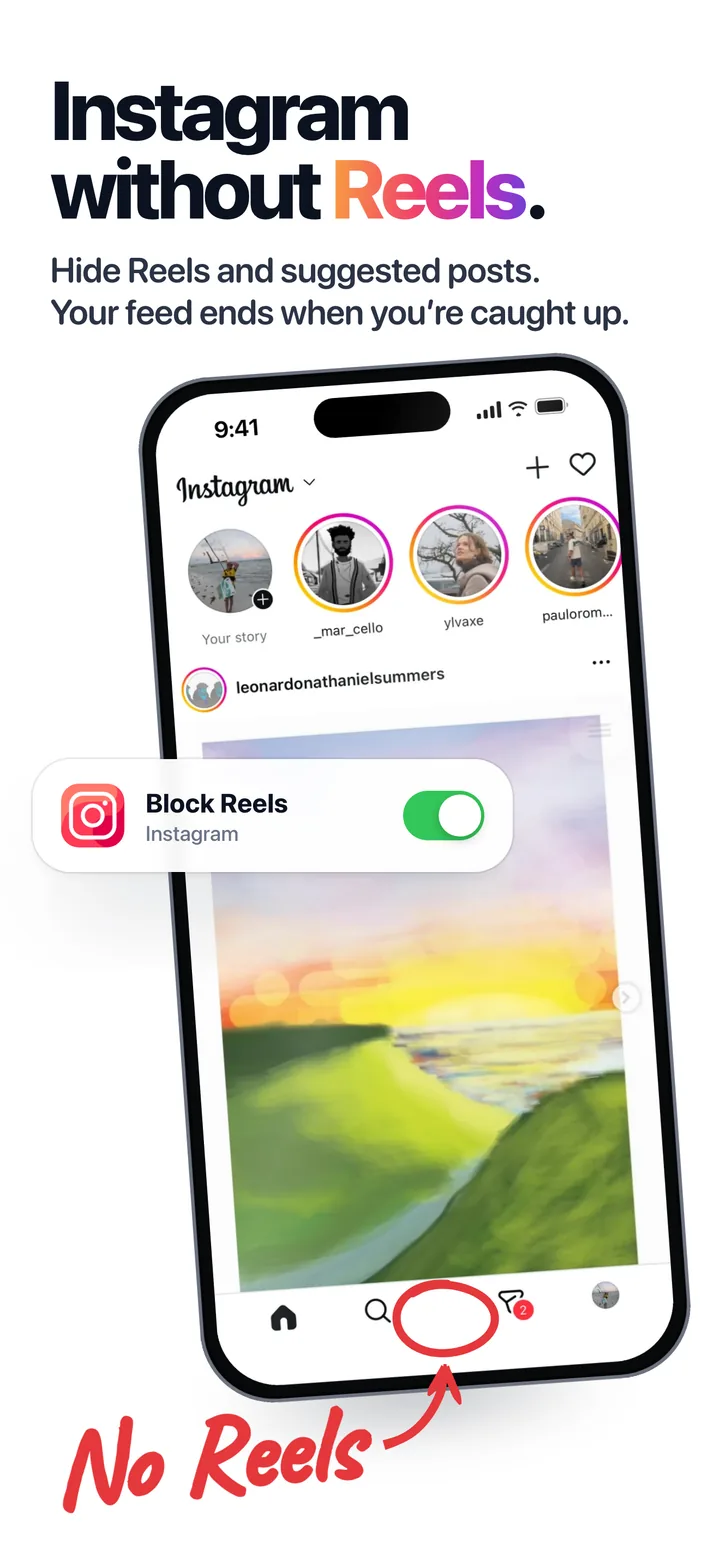
Instagram, TikTok, YouTube, Reddit, X, Snapchat, Facebook and LinkedIn open in Fluid Friction's own browser, where you pick what to hide in each one: Reels, Shorts, Stories, Explore, For You, recommendations and more. Your DMs, search and the people you follow stay. The setup is in how to block Instagram Reels on iPhone.
On top of that, and only if you want it, the feed you keep can resist your thumb. Scrolling drags through on screen fluid, and past a line a bubble has to form and rise before the feed moves on, so one deliberate drag moves one post. It is optional. Plenty of people only hide Reels and never turn it on. How it works is in how scroll friction works.
Around that, all free: Instagram and Snapchat notifications through Fluid Friction, app and website blocking behind a calm screen that counts your opens left, open limits with cooldowns, schedules, a focus timer with a countdown in the Dynamic Island, NFC tags you tap to start a session, and a weekly screen time recap. Everything is in Fluid Friction on the App Store.
When Spool is the better pick
- Explaining yourself is what works for you. If a spoken reason stops you where a pause screen does not, Spool's method is the point, and Fluid Friction has nothing like it.
- You want AI insights on your excuses. Spool turns every reason into a pattern you can read back. Our insights come from your screen time, not from what you tell us.
- You already pay for it and it works. Switching costs a setup and a few days of new habits.
- You want the simplest feed filter. If you only want Reels gone, with fewer settings, the Snowscroll alternative page compares the plainer options.
Where Fluid Friction is ahead
- Every blocking tool is free. Spool's Full Access is $4.99 a week or $44.99 a year.
- Eight apps and any website. Spool's Focus Web covers Instagram, YouTube and Facebook. Fluid Friction also covers TikTok, Snapchat, Reddit, X and LinkedIn, plus any site you add.
- Notifications keep coming. Instagram and Snapchat notifications come through Fluid Friction, so you can delete the real apps and still hear from people.
- Nothing you say goes to an AI. There is no account, and no reason to record before an app opens.
- The feed you keep can slow down. Optional friction on every swipe, on top of feed removal.
On iPhone both apps show the social sites in their own browser, because iOS allows nothing else, so a few features of the native apps are missing in both.
How to switch from Spool
Cancel the subscription first
Spool's plans renew automatically. Open Settings on your iPhone, tap your name, then Subscriptions, and cancel it there so it ends at the close of the period you paid for.
Install Fluid Friction and pick your apps
Choose the social apps you use and switch off the feeds you want gone in each. Sign in to each site once, the same way you would in Safari.
Block the apps you used Spool for
Add them to a block group with an open limit, so tapping the real app shows a calm screen and a count of opens left. Add a schedule for your weak hours.
Common questions
Is Spool free?
No. Spool's App Store listing sells Full Access at $4.99 a week or $44.99 a year (checked 11 November 2026). Fluid Friction's blocking tools, schedules and feed removal are free.
What is the best free alternative to Spool on iPhone?
Fluid Friction removes Reels, Shorts and Explore while DMs keep working, and blocks apps behind a calm screen with schedules, all free. If you want a pause before apps open instead, ScreenZen is free and one sec is free for one app.
Does Fluid Friction make me explain why I want to open an app?
No. It shows a calm screen with a count of opens left, and it can add friction to the scroll if you turn that on. It never asks for a reason, and nothing you say or type goes to an AI.
Do I have to use the scroll friction?
No. It is optional. You can use Fluid Friction only to hide Reels, Shorts and the other feeds, and leave the friction off.
Is there a version for Android?
Yes. On Android, Fluid Friction removes Reels and Shorts inside the real apps rather than in a browser. The setup is in how to block Instagram Reels on Android.
- Free Snowscroll Alternative for iPhone: Feeds Gone, DMs KeptLooking for a free Snowscroll alternative? Snowscroll removes Reels and Shorts on iPhone but is paid only. Compare it with a free app that keeps your DMs.
- Free one sec Alternative: Friction That Does Not Wear OffLooking for a free one sec alternative? one sec Pro costs $3.99 to $99.99 on Google Play. Compare the options, and a free one that resists every swipe.
 How to Block Instagram Reels on iPhoneInstagram has no switch to disable Reels. Block Instagram Reels on iPhone in a few minutes and keep your DMs, Stories and feed. Free, no account needed.