Choosing a tool4 min read
Free NoScroll Alternative: Block Reels and Shorts Without Ads
NoScroll by Curizic blocks Reels and Shorts on Android and has over a million installs, but the free app contains ads and its in-app purchases run from $0.99 to $49.00. A free NoScroll alternative is Fluid Friction, which blocks the same feeds inside the real apps with no ads and no account, and adds friction to the feed you keep.
On this page (7 sections)
NoScroll does one thing that matters: it blocks Reels and Shorts on Android while the rest of each app keeps working. Over a million people have installed it, and if it works for you, keep it.
First, which NoScroll. This page is about NoScroll by Curizic, the Android app that blocks short videos, listed on Google Play as a Reels and Shorts blocker. On the iPhone App Store, "No Scroll" is a different app from a different company, Self Invest LLC, which sets time limits on apps through Apple's Screen Time rather than removing Reels. If you are on an iPhone, the Instagram Reels guide for iPhone is the better starting point.
The usual reasons people look for a NoScroll alternative are the ads and the price. Google Play marks the app as containing ads, and its in-app purchases run from $0.99 to $49.00. We build one of the alternatives, Fluid Friction, so read this as interested rather than neutral.
NoScroll vs Fluid Friction
From each app's Google Play listing, checked in October 2026.
| NoScroll (Curizic) | Fluid Friction | |
|---|---|---|
| Platform | Android | Android and iPhone |
| Blocks Reels and Shorts inside the apps | Yes | Yes |
| TikTok For You and Snapchat Spotlight | Not named in its listing | Yes, one switch each |
| Contains ads | Yes | No |
| In-app purchases | $0.99 to $49.00 | Optional cosmetic subscription only |
| Friction on the feed you keep | No | Yes, on every swipe |
What NoScroll does well
- The right target. It blocks the short video surface, not the whole app, so messages and browsing keep working.
- Modes for different days. Its focus plans range from blocking every reel to a Curious mode that lets a few through, and a mode that plays a short like a normal video.
- A choice of action. When a short is detected it can close the player, exit the app or lock the screen.
- Shorts inside other apps. It can catch YouTube Shorts that load inside apps other than YouTube.
- App and site blocking and a PIN that changes every minute, which suits parents.
Why people look for a NoScroll alternative
The ads. An app you open to stop being pulled into content that shows you ads works against itself for some people. Fluid Friction has no ads at all.
The price. NoScroll's purchases go up to $49.00. Fluid Friction keeps every blocking tool free, and its only subscription changes themes and dark mode.
Removing Reels was not enough. With Reels gone, the home feed is still an infinite column that moves with one flick. Friction is the answer to that part, and why app blockers don't work explains why a wall alone tends not to last.
What Fluid Friction does differently
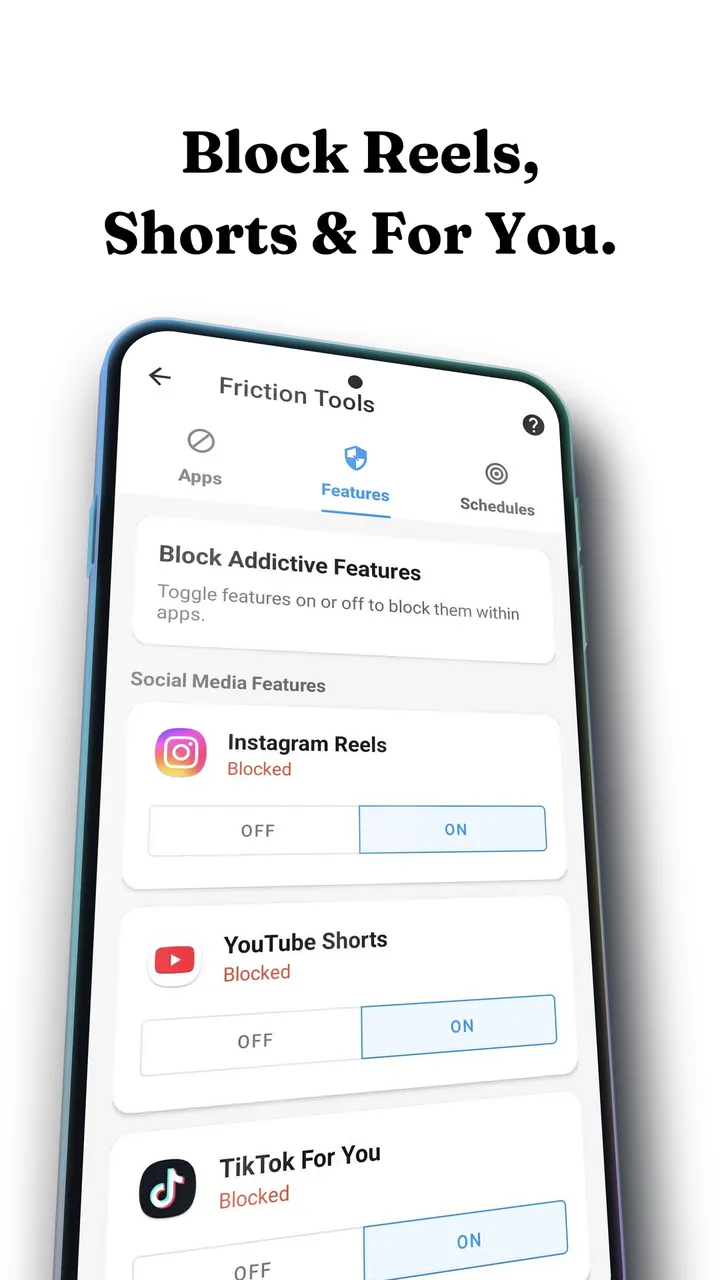
On Android, Feature Blocking closes Instagram Reels, YouTube Shorts, TikTok For You, Snapchat Spotlight and Facebook Reels inside the real apps, one switch each, and the rest of each app stays. The step by step setup is in how to block Instagram Reels on Android and how to block YouTube Shorts on Android.
Then the part NoScroll does not do: every swipe on the feed you keep drags through on screen fluid, and past a threshold a bubble has to rise off the screen before the feed moves. You can still scroll, never by accident.
Around that, all free: schedules, daily open limits, a focus timer and NFC profiles that switch with a tap of any tag you own. It is free on Google Play.
Moving from NoScroll to Fluid Friction
If you are switching, this keeps the gap short.
- Install Fluid Friction and turn on its accessibility permission. Android asks for it once, because that is how the app sees which screen is open.
- Open Feature Blocking and switch off the feeds NoScroll was blocking: Instagram Reels, YouTube Shorts, and TikTok For You or Snapchat Spotlight if you use them.
- Pick a friction strength. Gentle, Moderate or Intense sets how hard each swipe pushes back on the feed you keep. Moderate is a good start.
- Add a schedule if evenings are the problem. Smart Friction presets such as Night Guard make it stronger after 10pm without a setting you have to remember.
- Pause NoScroll for the same apps, or uninstall it, so the two do not fight over one screen.
What to check before switching
- The permission. Both apps use Android's accessibility service to see which screen is open. Read what each says it does with it. NoScroll says it only uses it to block short videos; Fluid Friction reads screen structure, never message contents.
- The Data safety section on each Google Play listing, before you install.
- Battery optimisation. On Samsung, Xiaomi and other skins, exempt whichever blocker you choose, or it may stop in the background.
Common questions
Is NoScroll free?
NoScroll is free to download, but Google Play marks it as containing ads and lists in-app purchases from $0.99 to $49.00. Fluid Friction is a free alternative with no ads, where blocking Reels and Shorts and every other blocking tool is included.
Is NoScroll safe?
NoScroll uses Android's accessibility service and says it only uses it to block short videos. As with any app that has that permission, read the Data safety section on its Google Play listing before installing. The same check applies to Fluid Friction.
Is NoScroll on iPhone?
NoScroll by Curizic is an Android app. The App Store's "No Scroll" is a different app from another company that sets time limits through Screen Time. On iPhone, Fluid Friction removes Reels and Shorts by opening those apps in its own browser.
What is a good free alternative to NoScroll?
Fluid Friction blocks Reels, Shorts, TikTok For You and Snapchat Spotlight inside the real apps for free with no ads, and adds friction to the feed you keep. ScrollGuard is another option with a free core and paid extras.
Can I use NoScroll and Fluid Friction together?
You can, but both watch the same screens, so turn off a feed in only one of them. Most people pick one so the setup stays simple.