Why scrolling wins
How to Stop Scrolling on Your Phone: 9 Fixes That Work
To stop scrolling on your phone, make scrolling less automatic rather than trying harder: cut the notifications that start it, block the endless feeds you did not choose, add friction so every swipe takes a moment of effort, and use a schedule for the hours you lose most. These nine fixes work on iPhone and Android, and most take a minute each.
On this page (6 sections)
You do not decide to scroll for an hour. You decide to check one thing, and the feed does the rest. That is why "just stop" does not work: there is never a moment where you choose to keep going, so there is never a moment where willpower can step in.
What works is changing the phone so scrolling stops being automatic. Here is how to stop scrolling, in nine fixes, ordered by how much difference they make for the effort. Do the first three today and the rest when you are ready.
How to stop scrolling: 9 fixes, in order
Turn off every notification except people
Settings, then Notifications, on either phone. Keep messages; drop likes, suggestions and "new posts". Most scrolling starts with a buzz.
Move feed apps off your first home screen
On iPhone, into the App Library; on Android, into the app drawer. Opening a feed should take a search, not muscle memory.
Charge your phone outside the bedroom
The cheapest fix there is, and the one that does most for late night scrolling.
Block the feed, keep the app
Reels, Shorts and For You are separate from the parts of the app you use. Block them and keep messages and subscriptions; guides for each app are below.
Hide the suggestion surfaces
Explore, suggested posts and recommended videos refill the feed when your friends run out. Following only feeds end, which is the point.
Add friction to every swipe
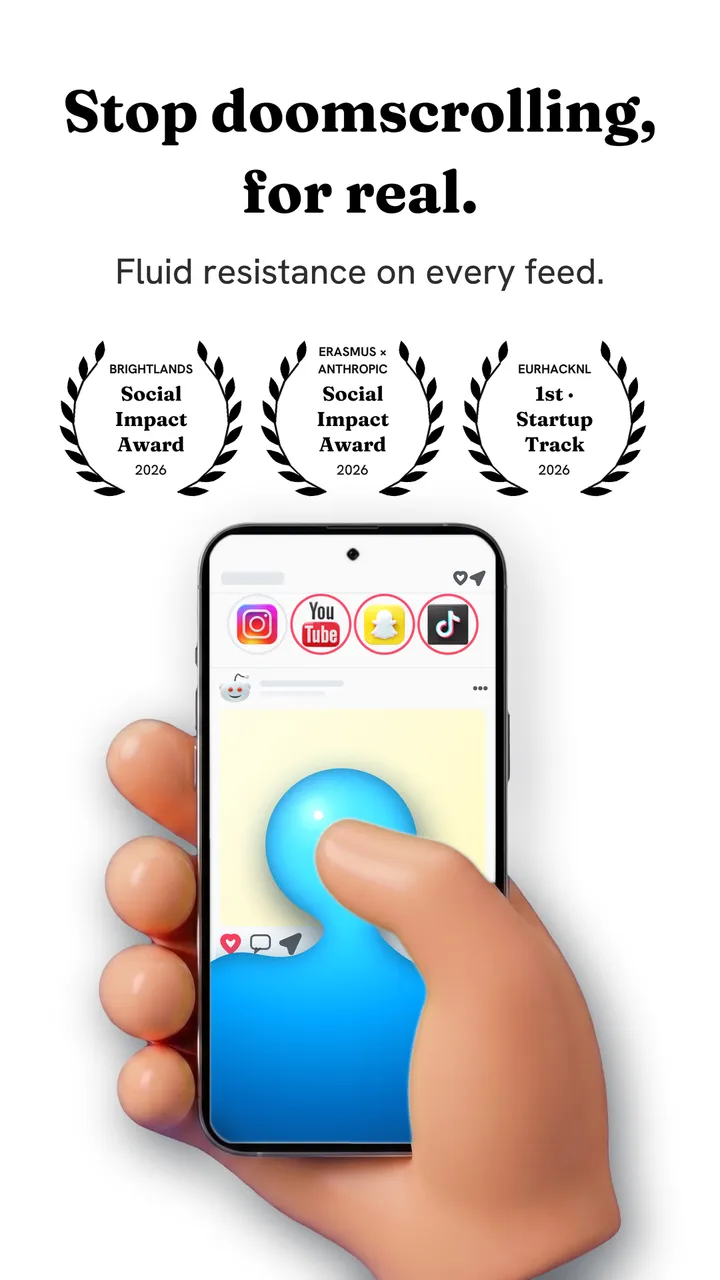
Fluid Friction makes each swipe drag through on screen fluid, and the feed only moves after a small push. You can still scroll on purpose; you cannot scroll on autopilot. It is free on Google Play and the App Store.
Schedule it for your worst hours
Scheduled Blocking closes an app during set hours, such as your working day, and Sleep & Alarm locks feeds from bedtime until your alarm. Strict when it matters, open when it does not, which is why people keep it.
Use grayscale in the evening
Colour is part of the reward. Android's Bedtime mode can switch it on by schedule; on iPhone, use a Shortcuts automation.
Check your screen time weekly
Two minutes a week in Screen Time or Digital Wellbeing shows which app crept back up. Raise its friction rather than promising yourself to try harder.
How to stop scrolling on each app
Most scrolling happens in one or two apps. Start with yours:
| App | What runs long | Guide |
|---|---|---|
| Reels, Explore, suggested posts | Stop scrolling Instagram | |
| TikTok | The For You feed | Stop scrolling TikTok |
| YouTube | Shorts, recommendations, autoplay | Turn off YouTube recommendations |
| Home feed, suggested communities | Stop doomscrolling Reddit | |
| X | The For You timeline | Get rid of For You on X |
| Reels and suggested posts | Turn off suggested posts on Facebook |
Why you cannot just stop scrolling
Feeds are built so that continuing never feels like a choice. There is no last post, the next video is one flick away, and occasionally something great appears, which keeps you checking. Under those conditions, everyone scrolls longer than they meant to. The details are in why can't I stop scrolling.
That is also why the fixes above work. They do not ask for more willpower; they put back the stopping points the feed took away. A feed that ends, a swipe that costs a little, a phone that is not on the pillow: each one turns "keep going" back into a decision. For doomscrolling specifically, the news and short video kind, see how to stop doomscrolling.
How to stop scrolling at night
Late evening is when most people lose time, and it is a different problem from daytime scrolling: you are tired, nothing is scheduled next, and the phone is the easiest thing in reach. Charge it elsewhere, set a night lock window, and keep something dull and physical by the bed. More in how to stop scrolling at night.
If you keep scrolling anyway
Most people slip in the first fortnight, usually on a bad evening, and take it as proof that nothing works. It is not. A slip tells you which fix is missing. If you scrolled because the phone was in bed with you, the fix is where it charges. If you pushed through the friction for an hour, turn it up a level for that app, or block the one feed that kept you there. If you switched everything off, put your settings behind a PIN someone else holds. Adjust one thing, not everything, and give it another week.
If your goal is a lower daily total rather than fewer swipes, the settings that move that number on each phone are in how to reduce screen time.
Common questions
How do I stop scrolling on my phone?
Turn off notifications except messages, move feed apps off your home screen, block feeds like Reels and Shorts, and add friction so every swipe takes a moment of effort. Changing the phone works better than relying on willpower.
Is there an app that stops scrolling?
Yes. Fluid Friction adds friction to every swipe and can block feeds like Reels, Shorts and For You. It is free on iPhone and Android, with no account. Our guide to apps that stop doomscrolling compares the alternatives.
How do I stop scrolling without deleting apps?
Block the specific feeds you never chose, keep the parts you use such as messages, and add friction to the scrolling that remains. The app stays useful, and the endless part stops being free.
Why can't I stop scrolling?
Feeds have no end, the next post costs one flick, and occasional good content keeps you checking. There is never a moment where you choose to continue, so willpower has nothing to act on. Changing the setup puts those moments back.
How long does it take to stop scrolling so much?
Most people notice a difference within a week of changing their phone's setup. The first days feel odd, because you notice your thumb moving before you decided anything, which is the habit breaking.